
Chariot now lets you log in via text message and opt in to text updates on your claims. Here is how to turn both on in your profile.
News & Updates
How-To’s

Chariot has officially launched login via text message code as an alternative to email for every Chariot account. You can now enable text-message login and choose to receive claim updates by text as well.
What is new
Two settings are now available from your Chariot Claims profile.
Login via text message is a new alternative to the email login code, with a text code sent to your phone. Once it is on, you can log in without touching your inbox at all.
You can also opt into getting notifications by text message using a separate toggle in Profile, which allows us to send claim updates directly to your phone. Turning this on does not change how you log in. It just adds a text channel for updates you would otherwise receive via email. More on this via our next blog article!
How to turn on text message code login
Go to app.chariotclaims.com/sign-in and log in with your email as usual.
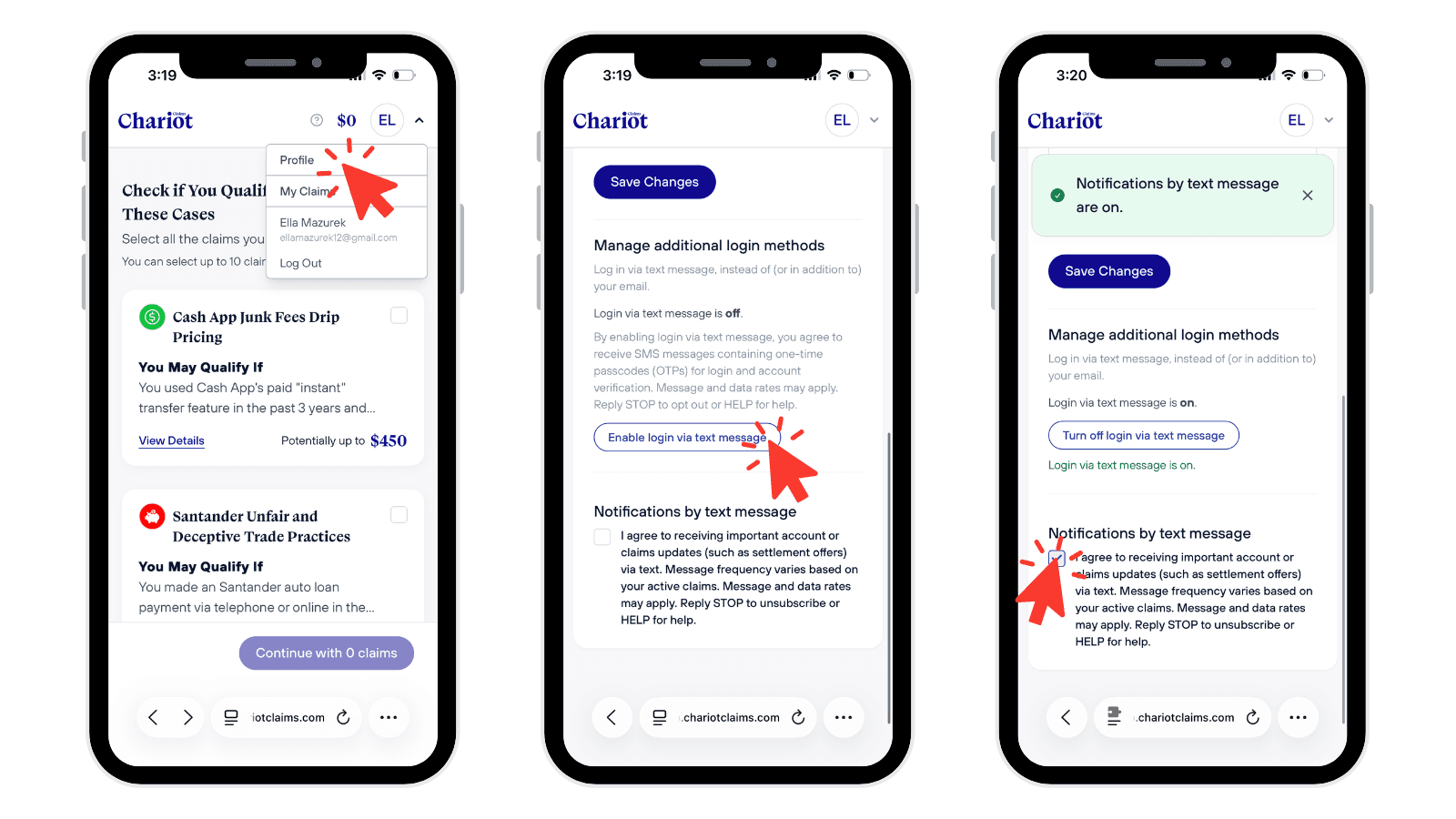
In the top right corner, click your initials and select Profile from the dropdown.
Scroll down to Manage additional login methods. You will see that login via text message is OFF by default.
Click ‘Enable login via text message’ and verify your phone number when prompted.
Once verified, the page will confirm that login via text message is on. From that point forward, you can log in using your phone number. If you ever want to switch back, the same button will read ‘Turn off login via text message’.
A couple of things to know before you enable it
Text login currently works with US mobile numbers only, so landlines and international numbers will not verify. Each phone number can be linked to only one Chariot account at a time, so if a number is already in use elsewhere, you will need to log in to that account rather than create a new one.
Try it out
If you would prefer to receive a login code via text message instead of email, the option is available in your profile right now! Log in at app.chariotclaims.com, click into your profile, and turn on whichever setting fits how you like to receive a code for login.
Questions about your account or a specific claim? Reach out any time at support@chariotclaims.com.
News & Updates
How-To’s


Chariot Claims does not provide legal advice. We are not attorneys. The information and services we provide should not be used as a substitute for legal advice. For specific legal concerns, we strongly recommend consulting with a qualified attorney. We expressly disclaim any liability related to actions taken or not taken based on our services or the information we provide.
Participation in settlement relief does not require signing up for third-party services. No-cost filing and support may be available from the claims administrator and class counsel. Those signing up for and authorizing Chariot Claims as their agent will receive comprehensive claim handling with the aim of securing the maximum settlement amount entitled.